
Every contractor knows they should be taking more photos. Almost none of them have a system for it, so the shots that do get taken are blurry, badly lit, missing the “before,” and scattered across three crew members’ phones where nobody can find them. Good contractor job site photos are not luck. They come from a simple routine that takes a few minutes per job, and that routine is the entire difference between a marketing asset and a camera roll full of clutter.
Quick Answer
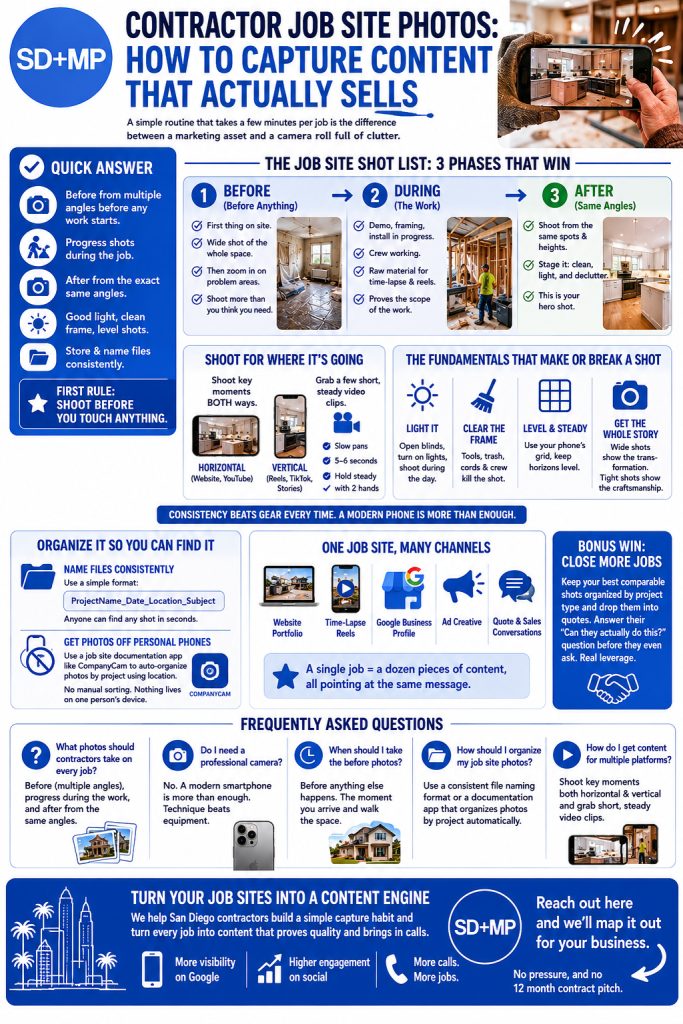
The key to useful contractor job site photos is a repeatable routine, not better gear. Shoot the “before” from several angles before any work starts, grab progress shots during the job, and shoot the “after” from the exact same angles as the before. Light it well, clear the frame, and store everything in one organized place with consistent file names. The single most common mistake is forgetting the before shot, so the first rule is simple: shoot before you touch anything. A two minute habit at the start of every job feeds your website, your social, your ads, and your Google listing for months.
Why Most Contractors Fail at This
The reason contractors miss out on visual marketing is rarely a lack of intent. It’s a lack of a system. When you rely on whoever happens to be on site to snap a few random photos on a personal phone, you get chaos. Inconsistent angles. No before shot. Files no one can find. A finished job that’s marketing gold and zero usable content to show for it.
Here’s the mindset shift that fixes it. Stop thinking of photos as something you do when you remember, and start thinking of them as a deliverable of the job, same as the punch list or the final walkthrough. The work isn’t done until the photos are captured and filed. Once it’s a step instead of an afterthought, the quality and consistency take care of themselves.
The Job Site Shot List
The contractors who win at this all run some version of the same simple shot list on every project. Three phases, a handful of frames each.
Before You Touch Anything
This is the one that hurts most when you skip it. No before, no comparison, and the comparison is the whole point. So make it the first thing that happens on site, before demo, before drop cloths, before anyone moves a thing. Spend two minutes capturing the existing condition. Get a wide shot of the whole space, then move in on the specific problem areas you’re about to fix. Shoot more than you think you need. Storage is free and you can’t go back.
A trick that works: tie the before shots to something that already happens at the start of every job. The moment you arrive and walk the space with the client or the crew, that’s your photo trigger. Pair it with a habit you never forget and you’ll never forget the photos either.
During the Work
Grab a few shots mid project. The torn out demo, the framing, the install in progress, the crew working. These are your b-roll, and they do two jobs. They become the raw material for time lapse clips and process reels, and they quietly prove the scope of the work, which makes your price make sense later when the client sees everything that went into it.
After, From the Same Angles
When the job’s done, shoot the finished result from the exact same spots and heights as your before shots. This is non negotiable, because matching angles is what makes a side by side or a slider actually land. If the before was a wide shot from the doorway at eye level, the after is a wide shot from the doorway at eye level. Mismatched framing breaks the comparison and the viewer stops reading it as the same space.
One more thing on the after shots, and this is where most contractors leave money on the table: stage it. Clean the space completely, open the blinds, turn on the good lighting, remove the cords and clutter, maybe add a couple of simple props like a plant or a bowl on the counter. The after shot is the hero image of the entire job. Treat it like one.
Shoot for Where It’s Going
Here’s a piece almost nobody plans for. Different platforms want different shapes, and if you only shoot horizontal, you’ll be cropping and compromising forever. So shoot the key moments twice: once horizontal for your website and YouTube, once vertical for reels, TikTok, and Stories. It costs you ten extra seconds on site and saves you from a useless library of photos that don’t fit half the places you want to post them.
Same logic for video. A few seconds of slow, steady panning footage of the finished space is worth more than a shaky 30 second clip. Hold the phone with both hands, move slowly, and let each shot breathe for five or six seconds. You’re capturing clips to edit later, not filming a documentary on the spot.
The Fundamentals That Make or Break a Shot
You do not need a professional camera. A modern phone is more than enough, and the contractors getting great results are almost all shooting on phones. What actually matters is a few basics that cost nothing:
- Light it. Open every blind, turn on the lights, and shoot during the day when you can. Bad light is the number one thing that makes a real transformation look unimpressive.
- Clear the frame. Tools, trash, cords, and stray crew members kill the shot. Take ten seconds to tidy what’s in view.
- Hold it level and steady. Crooked horizons read as sloppy. Most phones have a built in grid, so turn it on and use it.
- Get the whole story. Wide shots show the transformation, tight shots show the craftsmanship. You want both.
Consistency beats gear every single time. If you want a quick primer on the basics of framing and light, Photography Life’s beginner guide is a solid free resource.
Organize It So You Can Actually Find It
Photos you can’t locate are worthless. Generic file names like IMG_4921.jpg are how a great shot disappears forever, and digging through disorganized files quietly eats hours of office time every week. The fix has two parts.
First, name files consistently across the whole company. A simple format like ProjectName_Date_Location_Subject means anyone can find any shot in seconds.
Second, and better, get the photos off personal phones entirely. Job site documentation apps like CompanyCam auto organize photos by project using location, so there’s no manual sorting and nothing lives on one person’s device where it gets lost when they leave. For a growing contractor, that one change removes most of the chaos on its own.
One Job Site, Many Channels
Here’s the payoff for running the system. A single well documented job feeds everything you do. The before and after pair becomes a website portfolio entry. The progress clips become a time lapse reel. The finished shots feed your Google Business Profile, where photo volume directly drives phone calls, which we break down in our Google Business Profile photo guide. The strongest pair becomes ad creative. One shoot, a dozen pieces of content, all pointing at the same message.
There’s a quieter win too. Keep your best comparable shots organized by project type and you can drop them straight into a quote. When a homeowner asks about a kitchen and you attach two photos of a similar kitchen you finished last month, you’ve answered the “can they actually do this?” question before they’ve finished reading the estimate. That’s a real close rate lever, and it costs nothing because you already took the photos.
If you want the full case for why these transformation shots convert the way they do, read why before and after photos win more jobs. And to see how capture fits into the larger marketing system, our marketing for San Diego contractors page lays out the whole stack.
Frequently Asked Questions
What photos should contractors take on every job?
At minimum: before shots from multiple angles taken before any work starts, a few progress shots during the work, and after shots taken from the same angles as the before. Matching the before and after angles is what makes the comparison work.
Do I need a professional camera for job site photos?
No. A modern smartphone is more than good enough. What matters is consistency: good light, a clean frame, level framing, and shooting the after from the same angle as the before. Technique beats equipment.
When should I take the before photos?
Before anything else happens on site. The moment you arrive and walk the space, capture the existing condition from several angles. If work has already started, the before shot is gone, so make it the first step of every job.
How should contractors organize their job site photos?
Use a consistent file naming format across the company, or better, a job site documentation app that organizes photos by project automatically. That keeps shots off personal phones and saves hours of searching.
How do I get content for multiple platforms from one job?
Shoot the key moments both horizontal and vertical, and grab a few short, steady video clips alongside your photos. One visit then produces website images, a reel, ad creative, and photos for your Google listing.
Turn Your Job Sites Into a Content Engine
If your crews are finishing great work but the photos are an afterthought, you’re sitting on marketing gold and never cashing it in. We help San Diego contractors build a simple capture habit and turn every job into content that proves quality and brings in calls.
Reach out here and we’ll map it out for your business. No pressure, and no 12 month contract pitch.

