Get Our Content First on Google
Google now lets you choose which sources show up first in your search results and AI answers. Add SD Marketing Pros as a Preferred Source and you'll see our latest contractor marketing tips before anyone else.
Add Us as a Preferred Source on Google
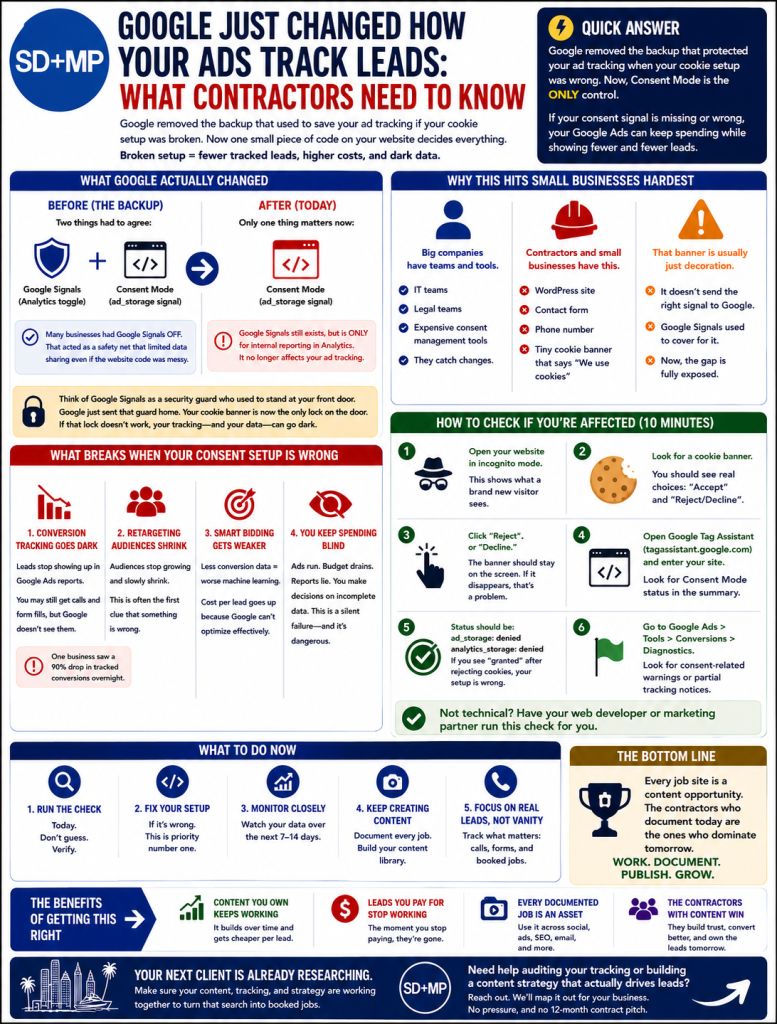
Here is the short version. For years, a setting buried inside Google Analytics was acting like a backup generator for your ad tracking. If your website’s cookie setup was broken, that backup kept some of your data flowing anyway. As of today, Google removed that backup. Now one small piece of code on your website decides everything.
If that code is missing or set up wrong, your Google Ads account can keep spending your money while showing you fewer and fewer leads. The ads still run. The clicks still cost you. But the part that tells you what is working can go dark without a single error message. This post explains what happened in plain English, who gets hurt, and exactly how to check if you are one of them.
What Google Actually Changed
Google moved the control over your ad tracking from a setting it managed to a piece of code your website manages. That is the whole story in one sentence, but the details matter for your wallet.
Before today, two things had to agree before Google Ads could collect tracking data: a toggle called Google Signals inside your Analytics account, and a code signal called ad_storage that fires from your cookie consent banner. Both had to say yes. Many businesses had Google Signals turned off, sometimes on purpose, sometimes by accident, and that toggle being off acted as a safety net that limited data sharing no matter how messy the website code was.
Google’s own announcement, published in its Help Center as article 17016975, says that starting June 15, 2026, it will use Consent Mode as the single control for this data (you can read the source here). The Google Signals toggle still exists, but its only job now is internal reporting inside Analytics. It no longer touches your ad tracking at all.
Think of Google Signals as a security guard who used to stand at your front door. Google just sent that guard home and told you the lock on your own door better work, because that lock is all you have now. That lock is your cookie consent banner. If the banner is wired correctly, your tracking keeps running. If it is broken or fake, the door is wide open or jammed shut, and either way you lose.
Why This Hits Small Businesses Hardest
Small businesses get hit hardest because most of them do not have the layers of protection that big companies do. A large national brand has an IT team, a legal team, and expensive software whose only job is managing cookie consent correctly. When Google changes a rule, those teams catch it.
A contractor in San Diego usually has something very different. You have a WordPress site, a contact form, a phone number, and a little cookie banner at the bottom that says “we use cookies” with an OK button. That banner feels official. In reality, on most sites, it does absolutely nothing. It is decoration.
That decorative banner was never sending the right signal to Google in the first place. The Google Signals backup was quietly covering for it. Now that the backup is gone, the gap your banner left behind is fully exposed. If you have been getting steady leads from Google Ads while your banner did nothing, today is the day that arrangement can stop working.
What Breaks When Your Consent Setup Is Wrong
When your consent signal is wrong, four things start to fail at the same time, and none of them announce themselves.
Your conversion tracking goes dark. This is the big one. Conversions are how Google Ads records that a click turned into a lead. When the signal says no tracking is allowed, those leads stop showing up in your reports. You might still be getting calls and form fills in real life, but your Google Ads dashboard shows fewer and fewer of them. PPC industry reporting documented a real case where a business saw its tracked conversions drop by about 90 percent overnight after a similar consent change, and most of that lost data was gone for good.
Your retargeting audiences shrink. Retargeting is how you show ads again to people who already visited your site. Those audiences only grow when tracking is allowed. With a broken signal, the list stops filling up and slowly empties out. This is often the very first clue that something is wrong, because audience sizes drop before anything else does.
Smart Bidding loses its signal and your cost per lead climbs. Google’s automated bidding learns from your conversion data. Feed it less data and it gets worse at finding leads, which means it bids less efficiently and your cost per lead goes up. The cruel part is that this looks exactly like a slow market or a bad month, so most people blame the economy instead of their tracking.
You keep spending but cannot see what is working. This is the trap. The ads run, the budget drains, and your reports tell you a story that is not true. You make decisions based on numbers that are missing a chunk of reality. Marketing pros call this a silent failure, and it is the single most dangerous thing about this change.
How to Check If You Are Affected
You can check most of this yourself in about ten minutes, even if you are not technical. Here is how.
- Open your website in a private or incognito browser window. This makes sure you see what a brand new visitor sees, not a version that remembers your past choices.
- Look for a cookie banner when the page loads. If no banner appears at all, that is a problem. If a banner appears, look at the buttons. A real banner gives you a true choice, usually an “Accept” and a “Reject” or “Decline” that are equally easy to click. A fake banner just has an “OK” or an “X” to close it. An OK-only banner that gives you no way to say no is a decorative banner, and it is almost certainly not sending the right signal.
- Check whether your banner actually controls anything. This is the difference between a real consent setup and a fake one. A real banner blocks tracking until you choose. A fake one lets everything run the moment the page loads, no matter what you click. You usually cannot see this difference by looking, which is the whole problem.
- Use a free tool to confirm. Google offers a free checker called Tag Assistant that shows you whether your tags are behaving correctly. It can confirm whether your consent signals are firing the way they should. This is more technical, and it is a fair point to bring in help.
- Call your marketing person or agency if anything above looks off. If you opened your site and could not tell a real banner from a fake one, that is normal. This stuff is genuinely technical, and a quick audit by someone who knows what they are looking at beats guessing.
One more honest note. Google’s own built-in diagnostics can lag by 48 to 72 hours, so they are not a reliable same-day check. If you wait for Google’s dashboard to tell you something broke, you could lose days of data first. A live browser check is the fast, honest way to know today.
What to Fix and in What Order
Fix these in order, because the first item makes everything else pointless if you skip it.
First, install a real consent management tool, called a CMP. This is the software that runs a proper banner and sends the correct signal to Google. Google’s own documentation confirms that a tool like this is now the thing communicating consent to your tags (see Google’s Consent Mode docs). On WordPress, three solid options are Complianz, which has a strong free version and deep WordPress integration, CookieYes, which is simple to set up and free up to a traffic limit, and Cookiebot, which is more enterprise focused. For most San Diego contractors, Complianz free or CookieYes will do the job without spending much or anything.
Second, verify the consent signals are actually firing. Installing the tool is not the same as it working. Have someone confirm that when a visitor accepts, the signal flips to allow tracking, and when they reject, it correctly blocks it. This is the step most people skip, and it is the one that matters most.
Third, update your privacy policy. If your current policy or cookie notice mentions Google Signals as the thing protecting your visitors’ data, that language became inaccurate today. Your policy should describe how your site handles consent now and how visitors can change their choice. This is worth a quick review with whoever handles your legal language.
Fourth, test your conversion tracking end to end. Submit a test lead through your own form, then confirm it shows up where it should. This catches breaks that the other steps miss.
Fifth, set up the right defaults for where your customers are. If you serve customers only in California, the rules are based on giving people a clear way to opt out rather than blocking everything up front. If you advertise nationally or serve any visitors from Europe, you need stricter defaults. A good consent tool handles this with region-specific rules so you are not sending the wrong signal to the wrong group.
If you are weighing whether this is worth the effort against everything else on your plate, it helps to remember that tracking is what makes every other ad dollar measurable. Our take on the smartest marketing investment for contractors starts from the same place: spend where you can see the return.
The Bigger Picture
This change is one piece of a larger shift, and the direction is clear. Google is moving the responsibility for privacy and tracking off its own shoulders and onto business owners like you. The code on your website is now the final authority, which means technical accuracy on your site matters more than it ever has.
More is coming later in 2026. Google has already said that another setting, the one controlling ad personalization, will move to this same code-based system, and that IP addresses collected by its tag will start being encrypted and sent to your Ads account under Ads-side rules. Google has not given firm dates for these yet, but the pattern is set.
Here is the opportunity hiding inside all of this. The businesses that get their tracking right now will be in a far stronger position when the next change lands. While your competitors are still wondering why their leads look soft, you will have clean data, working campaigns, and a head start. This is no longer just about running ads. It is about whether your ad spend is measurable at all, and that is a fight worth winning early.
If You Are Not Sure What You Are Looking At
If you checked your site and could not tell whether your banner is real or just for show, that is completely normal. This is technical, it changed quietly, and Google did not exactly send a postcard to every contractor in San Diego explaining it.
This is the kind of thing we handle for contractors and small businesses every day. We make sure your tracking is wired correctly so that every dollar you put into ads actually shows up in your data, where you can see it and act on it. If you want a straight answer on whether your setup survived today’s change, that is a quick thing for us to check. You can learn more about how we approach internet marketing in San Diego, how we think about where contractors get the best value from their ad spend, and how the same care that protects your tracking also protects your website leads and your Google Business Profile.
Frequently Asked Questions
What changed with Google Ads tracking on June 15, 2026? On June 15, 2026, Google made the ad_storage Consent Mode signal the single control over whether Google Ads can collect tracking data from your website. Before this date, a Google Analytics setting called Google Signals also helped control this and acted as a backup. Now that backup is gone, so the only thing protecting your tracking is the consent signal your cookie banner sends.
Why did my Google Ads leads suddenly drop? If your tracked leads dropped this week with no other explanation, a broken cookie consent setup is a likely cause. When your banner does not send the correct signal to Google, conversions stop being recorded even though your ads keep running and real leads may still be coming in. The fix is to confirm your consent banner is wired correctly and actually sending tracking permission to Google.
What is Consent Mode and does my small business need it? Consent Mode is the system Google uses to learn whether a website visitor has allowed tracking, and yes, your small business needs it set up correctly if you run Google Ads. It works through a code signal sent by your cookie consent banner. Without a properly configured Consent Mode, your conversion tracking, retargeting, and automated bidding can all quietly degrade.
Does the cookie banner on my WordPress site count as Consent Mode? Most basic WordPress cookie banners do not count, because they only display a notice without sending any signal to Google. A real consent setup uses a consent management tool that blocks tracking until a visitor chooses, then sends that choice to Google. A banner with only an “OK” or close button is decorative and does nothing for your tracking.
Do California businesses need a cookie consent banner? California businesses do need a way for visitors to opt out of having their data sold or shared, though the rules differ from Europe’s. California law focuses on clear notice and a real opt-out option rather than blocking everything before a visitor chooses. After this Google change, even California businesses should use a proper consent tool so their Google Ads tracking sends the correct signal.
How do I know if my Google Ads conversion tracking is broken? The fastest way is to open your site in a private browser window, check whether a real consent banner appears, and use Google’s free Tag Assistant tool to confirm your tags fire correctly. You can also compare your recent tracked conversions against the calls and form fills you are actually getting. If your real leads are steady but your tracked conversions dropped, your consent setup is the first thing to inspect.